Disclaimer and Risk Warning: This content is for general information and educational purposes only, without representation or warranty. It should not be construed as financial, legal, or other professional advice, nor is it intended to recommend the purchase of any specific product or service. You should seek advice from appropriate professional advisors.
We’ve made starting your DeFi journey even easier. PancakeSwap now supports Social Login, allowing you to connect to PancakeSwap using Google, Telegram, Discord, or X (formerly Twitter), with no wallet setup required.
To celebrate, we’re partnering with Orderly Network ($ORDER), Cudis (CUDIS), and XPIN Network (XPIN) to launch a ~$15,000 trading campaign with a random lucky draw.
Campaign Details
Duration: August 22, 10:00 AM UTC, 2025 – September 12, 23:59 UTC, 2025 Total Rewards:
- 41,667 ORDER tokens
- 56,180 CUDIS tokens
- 10,000,000 XPIN tokens
Note: The ~$15,000 total reward pool (approximately ~$5,000 allocated per token) is based on token prices at the time the reward pools were initially set, before the campaign announcement. Participants will receive rewards in the fixed token amounts listed above, regardless of the token’s price at the time of distribution. As a result, the actual USD value of the rewards may vary depending on market prices when the tokens are distributed.
Official Token Contract Address
- ORDER: ORDER BEP20 Address
- CUDIS: CUDIS BEP20 Address
- XPIN: XPIN BEP20 Address
How to Participate
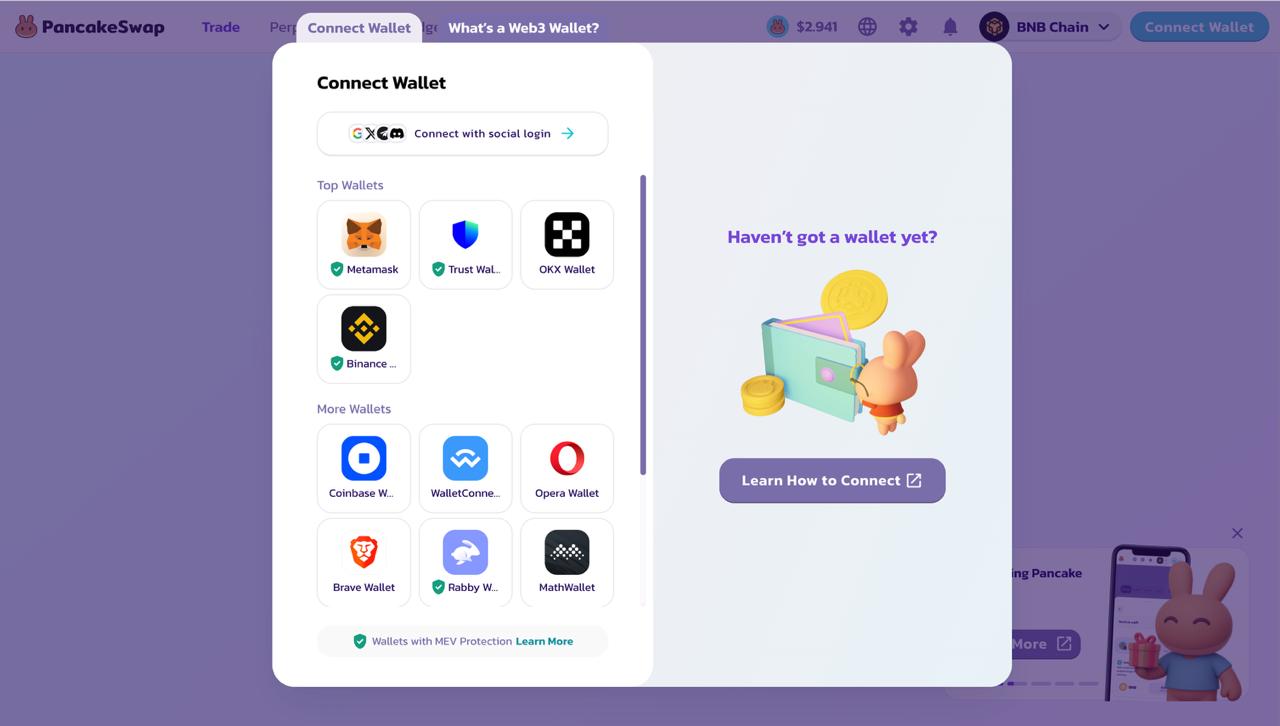
1. Connect with Social Login
Go to the PancakeSwap Swap Web Interface and connect with Social Login (Google, Telegram, Discord, or X).
2. Trade $100+ in ORDER, CUDIS, or XPIN on the BNB Chain
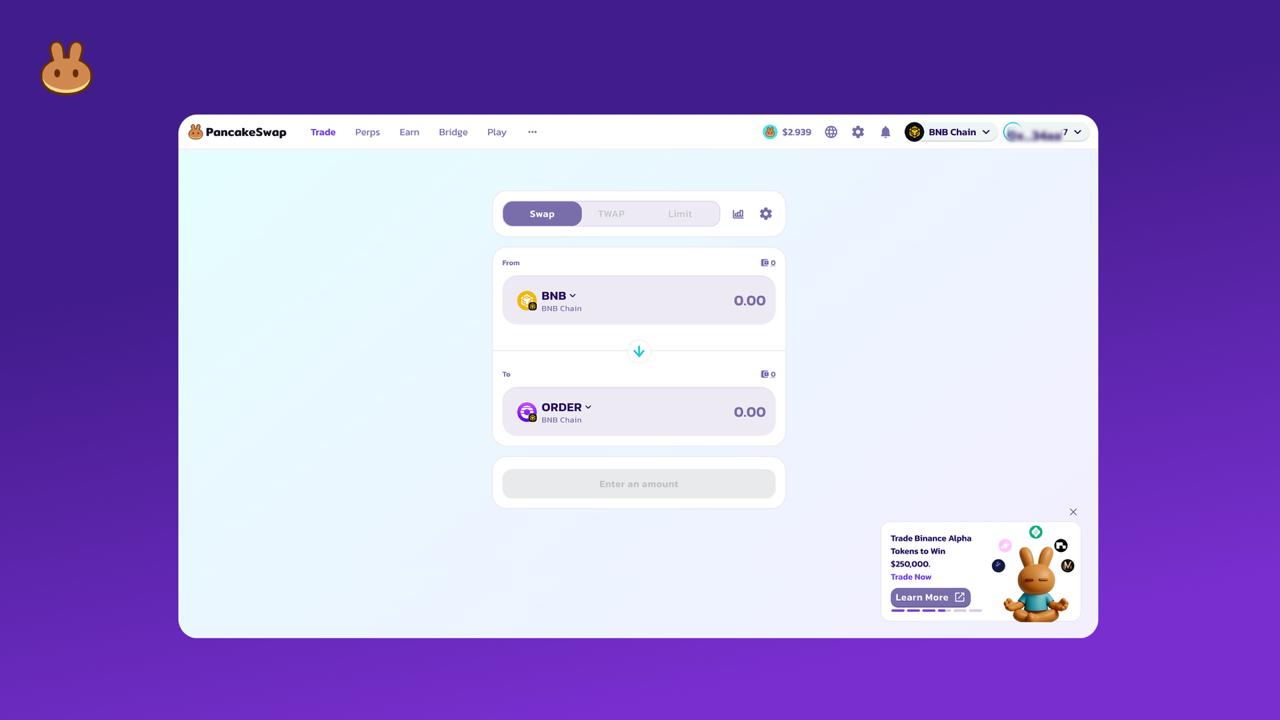
- Trade at least $100 USD worth of ORDER, CUDIS, or XPIN using any of these base tokens: CAKE, BNB/WBNB, USDT, USDC, USD1, BTCB, or ETH.
- Your total trading volume for each token (ORDER, CUDIS, or XPIN) is the sum of all your buy and sell transactions during the campaign; this can be done in one or multiple trades.
- Only trades made via PancakeSwap Swap Web Interface qualify; trades via external aggregators (e.g., 1inch, Telegram Bot, Binance Wallet’s built-in swap) or dApp browsers (such as Trust Wallet) do not qualify.
Example: You buy $60 worth of ORDER with USDT, then later sell $40 worth of ORDER for CAKE. Your total trading volume for ORDER is $100; you're eligible for the ORDER random lucky draw!
3. Get Entered into the Random Lucky Draw
- Trade $100 USD or more in ORDER to enter the ORDER random lucky draw.
- Trade $100 USD or more in CUDIS to enter the CUDIS random lucky draw.
- Trade $100 USD or more in XPIN to enter the XPIN random lucky draw.
Prizes (Random Lucky Draw)
- 50 winners for ORDER — each will receive 833.34 ORDER tokens (~$100 value).
- 50 winners for CUDIS — each will receive 1,123.6 CUDIS tokens (~ $100 value).
- 50 winners for XPIN — each will receive 200,000 XPIN tokens (~ $100 value).
Note: Each wallet can win only one reward per token. This means that a wallet cannot win multiple rewards for the same token; it can win once for each different token for which it qualifies. To be eligible for the random lucky draw for ORDER, CUDIS, and XPIN, your wallet must have a minimum trade volume of $100 USD for each token individually — that is, $100 for ORDER, $100 for CUDIS, and $100 for XPIN.
Terms & Conditions
- Only trades made through Social Login-connected wallets (Google, Telegram, Discord, or X) on the PancakeSwap Swap Web Interface are eligible.
- Trades made through EOA wallets (e.g., MetaMask, Trust Wallet, Binance Wallet, not connected via Social Login) are not eligible.
- Only trades made through the PancakeSwap Swap Web Interface, routing through either v2 or v3, will qualify. Trades via external platforms or aggregators (e.g., 1inch, Binance Wallet’s built-in swap, Telegram Swap Bot) or dApp browsers (such as Trust Wallet) do not qualify.
- Trades routed through PancakeSwap Infinity are not eligible. If your trade for these tokens is routing through Infinity pools, we recommend that you disable the “PancakeSwap Infinity” router in the settings during the campaign and re-enable it afterward.
- Rewards will be distributed in the respective tokens (ORDER, CUDIS, or XPIN) based on the exact token amounts listed in the prize above. Distribution will occur within 4 weeks after the campaign ends. Participants will receive fixed token amounts, regardless of the token’s market price at the time of distribution. As such, the final USD value of the rewards may vary depending on market conditions at the time of distribution.
- In PancakeSwap's absolute opinion, any trades executed through bad trading practices, including, but not limited to, wash trades, false trading, self-dealing, or trades that display any attributes of market manipulation ("Disqualified Trades"), will not be counted toward this campaign.
- PancakeSwap reserves the right to cancel, suspend, or postpone the Campaign or amend the Campaign rules at our sole discretion without notice to you.
- PancakeSwap will disqualify any entry from participants who do not meet the eligibility requirements as solely and absolutely determined by PancakeSwap.
- In the event of any dispute, PancakeSwap reserves the right to make all final decisions regarding the Giveaway.
- The information provided here is not intended as financial advice. It does not constitute a solicitation, recommendation, endorsement, or offer by PancakeSwap to buy, sell, or invest in any digital assets. Cryptocurrencies carry significant risks, including the potential loss of your entire investment. We strongly recommend seeking professional advice before making any financial, investment, or trading decisions.
Ready to Dive In?
No wallet? No problem.
Connect to PancakeSwap with your socials, trade, and stand a chance to win $15,000 in ORDER, CUDIS, or XPIN!